How to Pick an Emergency Fund Account With Strong Mobile Deposit

Last updated: November 19, 2026
Quick answer: compare 3 tools first—mobile deposit, ACH transfer, and external transfer—before you chase rate. For How to Choose an Emergency Fund Account With Strong Mobile Deposit and Transfer Tools, the right account is usually the one that lets you deposit a check, send an ACH transfer, and move cash back to checking with the fewest roadblocks.
Key takeaways
- Pick the app first, then the rate. If the money is hard to move, the account fails the emergency test.
- Mobile deposit matters most when a refund, rebate, or paper check is your only fresh cash source.
- External transfer speed can matter more than branch access if your checking account is at another bank.
- App controls are part of safety, not just convenience. Card locks, alerts, and transfer limits help you act fast without losing control.
- A strong mobile app can still be the wrong choice if it has transfer holds, low limits, or weak online banking support.
What should I look for in the app?

The right app gives you three things: mobile check deposit, fast ACH transfers, and clear controls over outgoing money. Start there, because those are the tools most likely to matter when an emergency hits and you need cash in motion.
Use this checklist in order:
- Check mobile deposit — Confirm the bank app supports depositing checks by phone and shows clear deposit limits and cutoffs.
- Check ACH transfer — Look for outbound ACH transfer support to your checking account or to an external bank you already use.
- Check external transfer — Make sure the app can link outside accounts without a clunky desktop-only process.
- Check app controls — Look for transfer limits, debit card controls, alerts, and two-factor sign-in.
- Check online banking — Verify the web account can do the same money moves as the app, not just balance viewing.
According to the Consumer Financial Protection Bureau, consumers should compare account features, access, and fees before opening a bank account, and the FDIC’s deposit insurance page is the place to verify how accounts are protected. Those two checks matter because a shiny app is not enough if the account rules are awkward or unclear. See the CFPB’s consumer banking guidance and the FDIC’s deposit insurance information at consumer banking guidance and deposit insurance information.
Online bank app or branch bank app?
An online bank app usually has an edge for mobile deposit and transfer speed, while a branch bank app can be better if you want in-person backup and a familiar branch network. That is the real trade-off, and it matters more than marketing labels.
| Criteria | Online bank app | Branch bank app | Winner for [condition] |
|---|---|---|---|
| Mobile deposit | Usually a core feature | Often available, but not always the main focus | Online bank app for phone-first users |
| ACH transfer | Often built into the app and web portal | Common, but sometimes slower to surface in menus | Online bank app for frequent transfers |
| External transfer | Usually easy to set up once linked | Can be good, but interface varies more | Online bank app for simple setup |
| App controls | Often strong card and transfer controls | Can be strong, but may be split across systems | Online bank app for app-heavy use |
| Branch access | No branch fallback | Branch help available | Branch bank app for people who want in-person help |
| Account opening | Often done fully online | May involve more steps | Online bank app for speed |
| Cash handling | Usually weaker for cash deposits | Better for cash and cashier checks | Branch bank app for cash-heavy users |
| Transfer confidence | Good if the app is polished | Good if the bank’s systems are mature | Tie for standard ACH use |
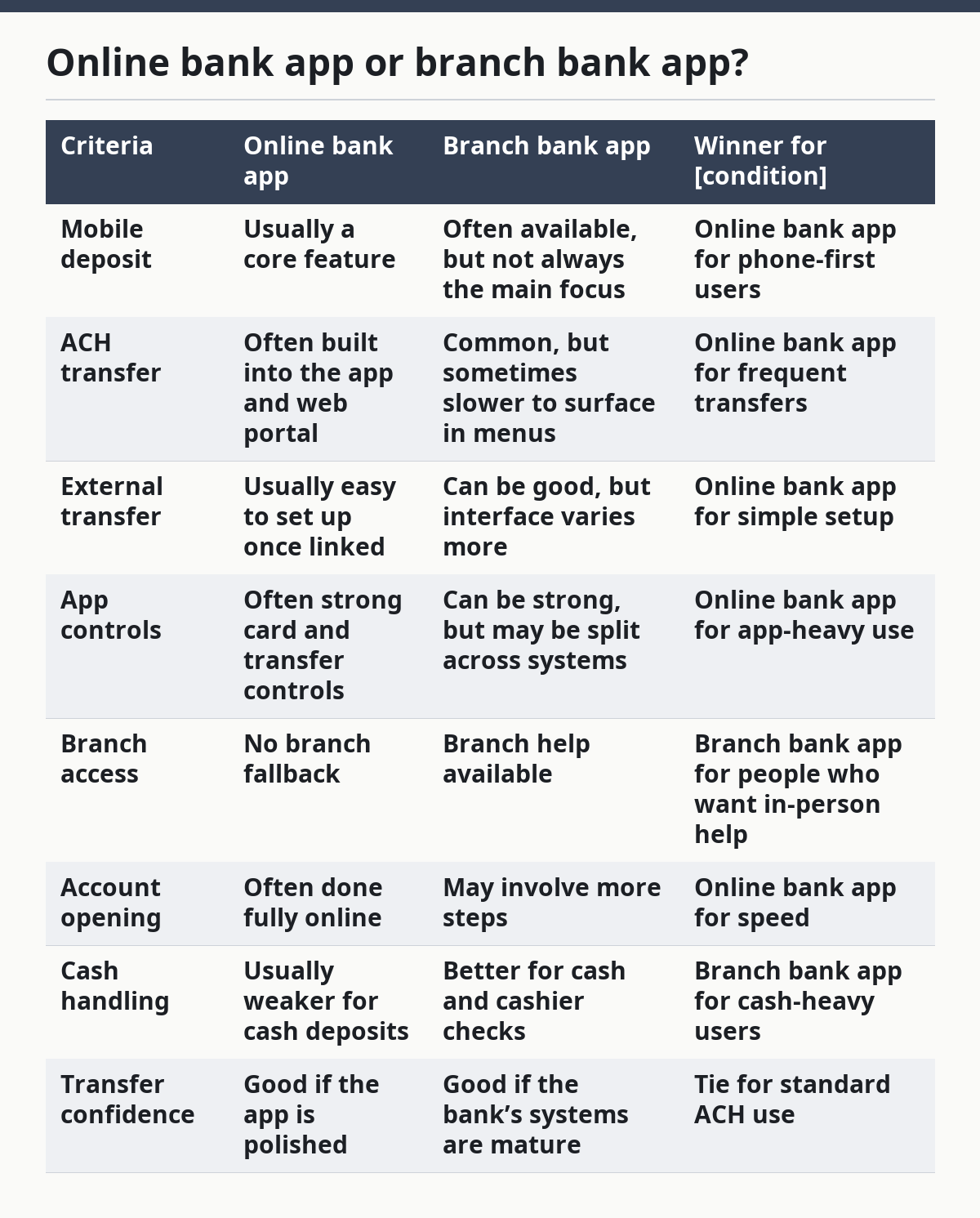
The online bank app wins for the reader who wants an emergency fund that lives mostly on a phone. The branch bank app wins for someone who expects to deposit cash or wants a person to talk to if something looks wrong. If the emergency fund will mostly sit there and move only a few times a year, the online bank app usually has the edge because the mobile tools are built into the daily experience.
The weak spot for online banks is the lack of a physical fallback. If your emergency money includes paper checks or cash, that can be a real drawback. The weak spot for branch banks is the app itself: some do basic balance work well but make transfers harder than they should be.
Which mobile deposit features matter most?
Mobile deposit matters most when the app gives you clear limits, quick confirmation, and a straightforward deposit flow. A bank can advertise mobile check deposit and still make the feature annoying if the limits are tiny, the hold times are unclear, or the app makes the photo step clumsy.
The features that actually change the choice are simple. Look for deposit by phone in the mobile banking app, a written policy on deposit limits, and obvious status updates after you submit a check.
If the app only shows a balance change days later and gives no useful timeline, that is not a strong emergency fund tool. That is also where the numbers matter: a 2-day wait is very different from same-day visibility.
This is also where a lot of readers overrate convenience. Mobile deposit is not the point by itself; the point is turning a paper check into usable emergency cash without a branch trip. If you receive checks rarely, mobile deposit is still worth having, but it should not outrank transfer quality. A bank with excellent mobile check deposit and weak external transfer support can still be the wrong choice.
Who should prioritize this feature? People who get refunds, reimbursements, or one-off checks and want one app to handle them. Who should skip it as a top priority? Someone whose emergency fund will only receive direct deposits or ACH transfers from a paycheck or another account.
How do ACH and external transfers change the choice?
ACH and external transfers decide whether your emergency fund is actually easy to reach from another bank. If the account cannot move money out to your checking account without friction, the account is weaker than it looks on paper.
ACH transfer is the backbone here. It is the standard way many banks move money between institutions, and it is the tool most readers will use when they need funds in checking. External transfer is the setup layer that lets the app recognize an outside bank account and send money there.
If the app makes linking an outside account painful, every future transfer becomes harder. That is why the setup step matters as much as the transfer screen itself.
The best version is simple: log in, pick the linked account, enter the amount, confirm the transfer. The weaker version hides transfer menus, requires repeated verification, or buries the hold rules in fine print. For an emergency fund, that friction matters more than a slightly better rate.
Strong transfer tools are a better signal than branch count because they tell you how the money will actually move. A savings account with a decent rate but clunky transfers may leave you with the wrong kind of comfort.
The Honest Side-by-Side
The better choice depends on whether you value phone-first control or in-person fallback. For most readers who want an emergency fund account with strong mobile deposit and transfer tools, the app-first account wins because it handles the exact jobs this money needs to do.
Compare the two account styles before you decide
- Mobile deposit
- Online bank app: usually strong and central to the design.
- Branch bank app: often solid, but the experience varies.
- ACH transfer
- Online bank app: often easier to find and use.
- Branch bank app: can work well, but interfaces vary more.
- External transfer
- Online bank app: usually more polished for linked accounts.
- Branch bank app: can offer the same tools, though the interface is not always as clear.
- App controls
- Online bank app: often better for alerts, locks, and transfer management.
- Branch bank app: may offer the same tools, but not always as clearly.
- Paper check deposit
- Online bank app: good if the camera flow is clean.
- Branch bank app: strong if you want branch backup.
- Cash handling
- Online bank app: usually weak.
- Branch bank app: usually better.
- Backup access
- Online bank app: limited.
- Branch bank app: better.
- Best fit
- Online bank app: phone-first saver.
- Branch bank app: saver who wants a physical office nearby.
The online bank app wins for pure emergency-fund use because the money tools are usually the main product, not an add-on. The branch bank app wins when the emergency fund also needs cash deposits or a local office. If the account will only sit in savings until you transfer it out, the app-first choice is usually cleaner.
When should I choose something else?
You should choose something else when the account’s app is good but the transfer rules or deposit rules do not match your life. That is the point where a nice interface stops mattering.
Here are the exception scenarios that flip the verdict:
- You deposit cash often. A branch bank app can beat an online bank app because cash handling matters more than transfer polish.
- You want in-person problem solving. If you prefer branch help for account access issues, a local bank can be the safer fit.
- You rarely move money. If the emergency fund will barely be touched, app quality matters less than basic account safety and access.
- Your main bank already has strong online banking. If your current bank app already has mobile deposit and ACH transfer features you trust, switching may not buy much.
These exceptions are real because the best emergency fund account is not always the most popular one. It is the one that fits the way the money will move in your life. If the account is not tied to paper checks, outside transfers, or mobile use, the app features may not need to be the deciding factor.
How do I make the final call?
Choose the account with the stronger mobile banking app if you want phone-based deposit and transfer tools to do the real work. Choose the branch bank account if cash deposits, branch help, or local support matter more than app speed. Neither is right if the account hides transfer rules, makes external transfers hard, or gives weak control over outgoing money.
A good emergency fund account should feel boring when you are calm and useful when you are stressed. If the app can handle mobile deposit, ACH transfer, external transfer, and basic controls without friction, that account passes the test. If it cannot, keep looking.
What if I only care about transfer speed?
Then transfer speed should decide the account, not the savings label on the front page. If the app makes linked transfers simple and lets you move money to checking through online banking without extra hoops, that is the better emergency fund choice.
The downside is obvious: speed can come with trade-offs in cash access or branch support. If those trade-offs matter to your household, the fastest app may not be the right answer. The right answer is the account that makes your most likely emergency move easy, not the one that looks best in an ad.
Drafted with AI; not yet reviewed by a person.